Clinical research scheduling that knows your protocol
Clinical trial scheduling software for research sites and study teams. DoctorConnect calculates every participant's protocol visit windows, books study visits that need several staff as one visit, and reminds participants by text, voice or email.
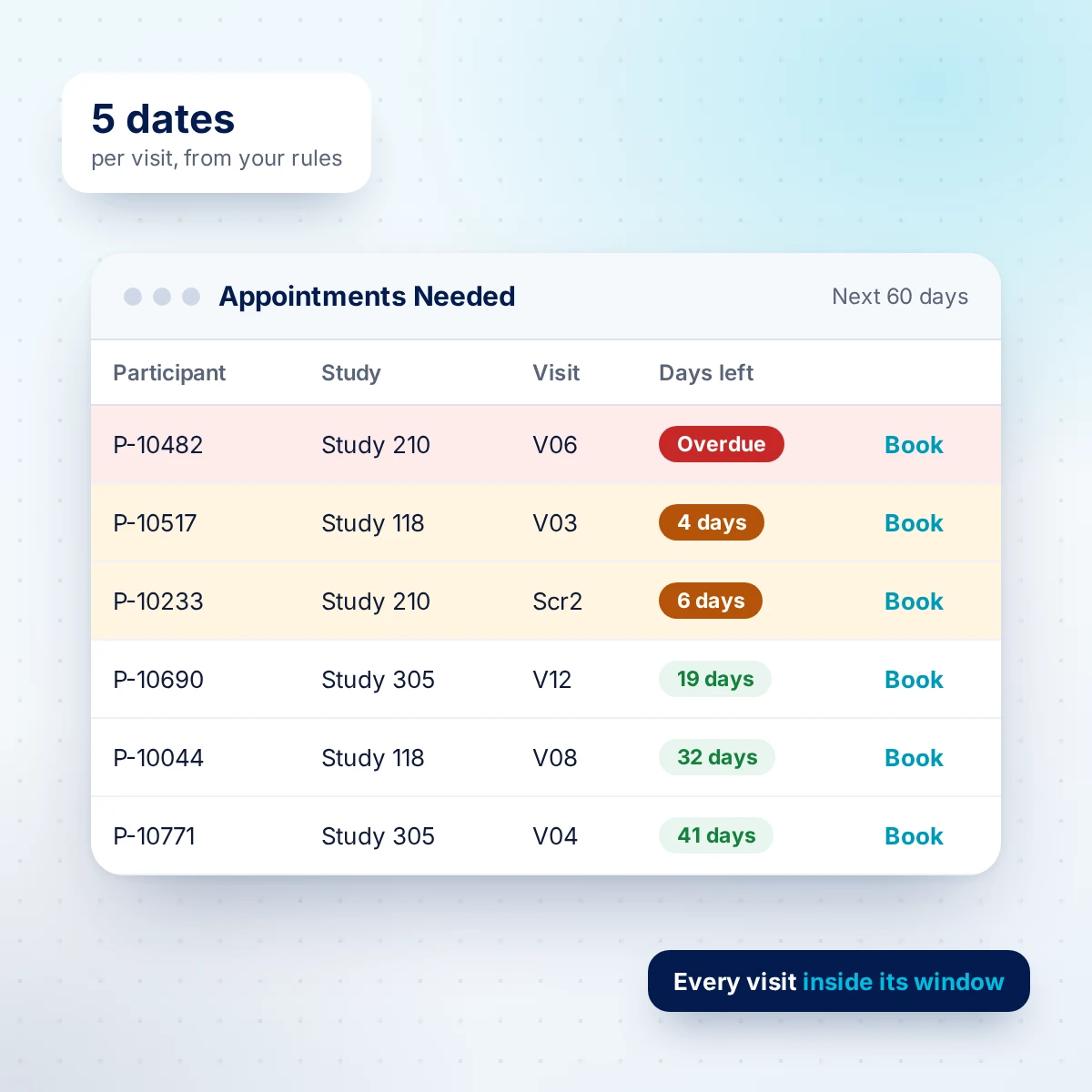
A general scheduler does not know your protocol
Missed and out-of-window visits
A visit that slips past its window can become a protocol deviation. Finding the ones at risk means cross-checking two systems by hand.
Visits that need three people
A nurse, a counselor and the lab, each for a different stretch of the visit. Staff scan side-by-side columns to fit it in, then book each part separately.
Reports by hand count
Screening and enrollment tables, attrition by visit, recruitment by venue. Sponsors and PIs ask; someone stays late counting.
Legacy tools nearing the end
An on-premises scheduler being retired, an Access database only one person understands, or calendar logic stuck in spreadsheet formulas.
Track every protocol visit window
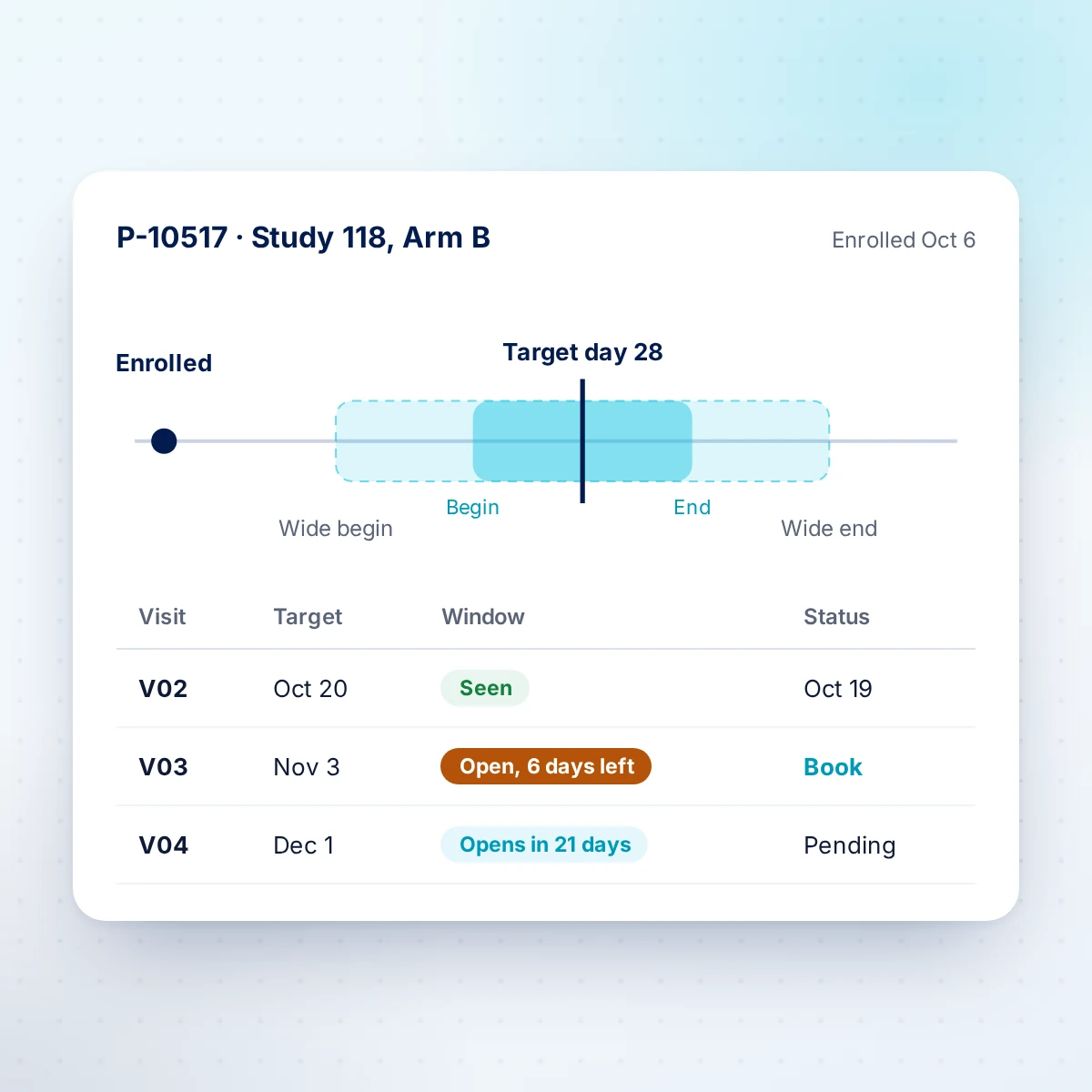
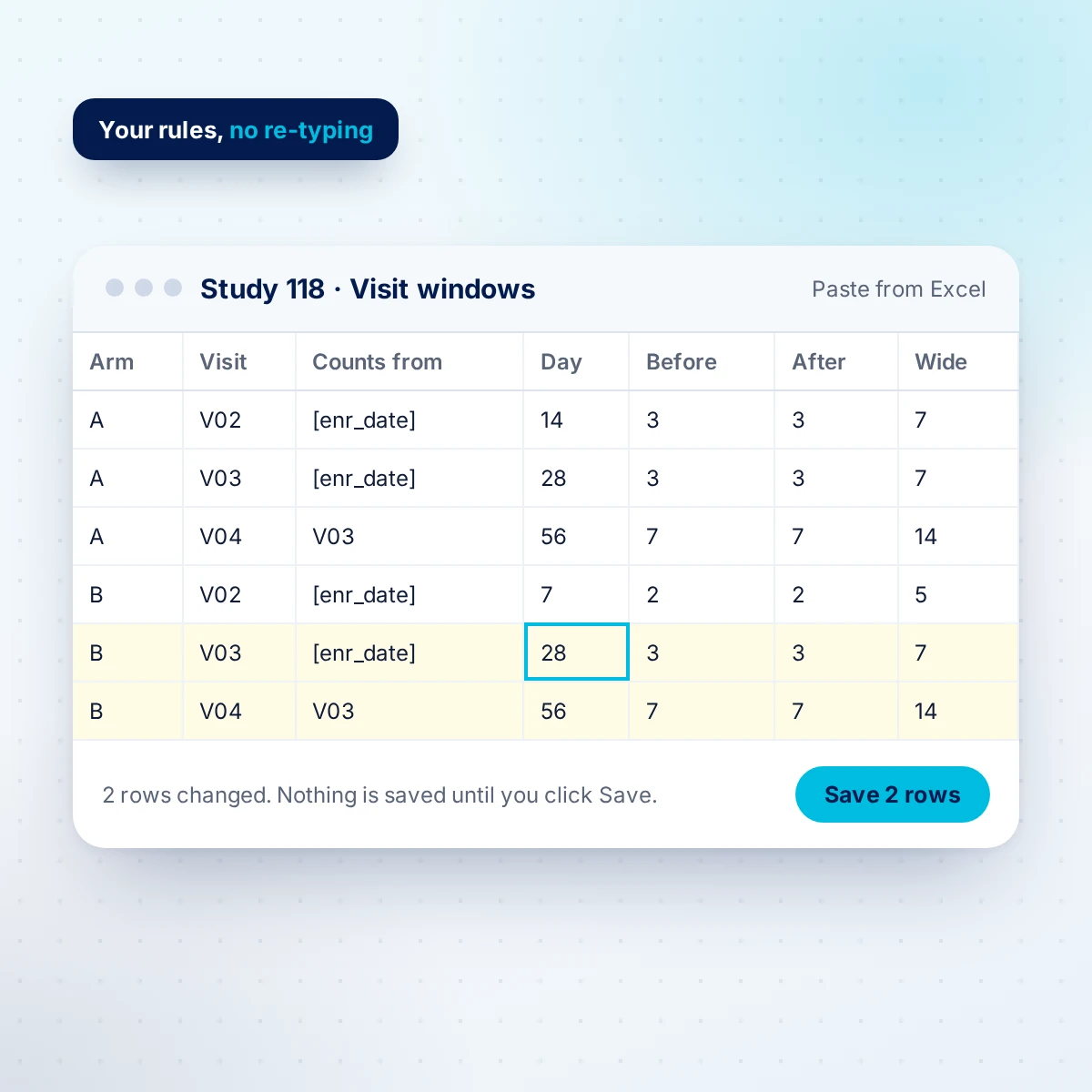
Set up each study's arms, visit codes and window rules in a spreadsheet-style grid, or import them from your study workbook. DoctorConnect calculates five dates for every required visit of every enrolled participant and keeps them current.
- Count from the enrollment date, any study date, or the day a prior visit was seen
- Regular and wide (allowable) windows, different per arm
- Countdown to the last allowable day on every visit
- Ignore a visit with a reason when it will not happen, so it is never counted as missed
- Recalculated every night and whenever a date or visit changes
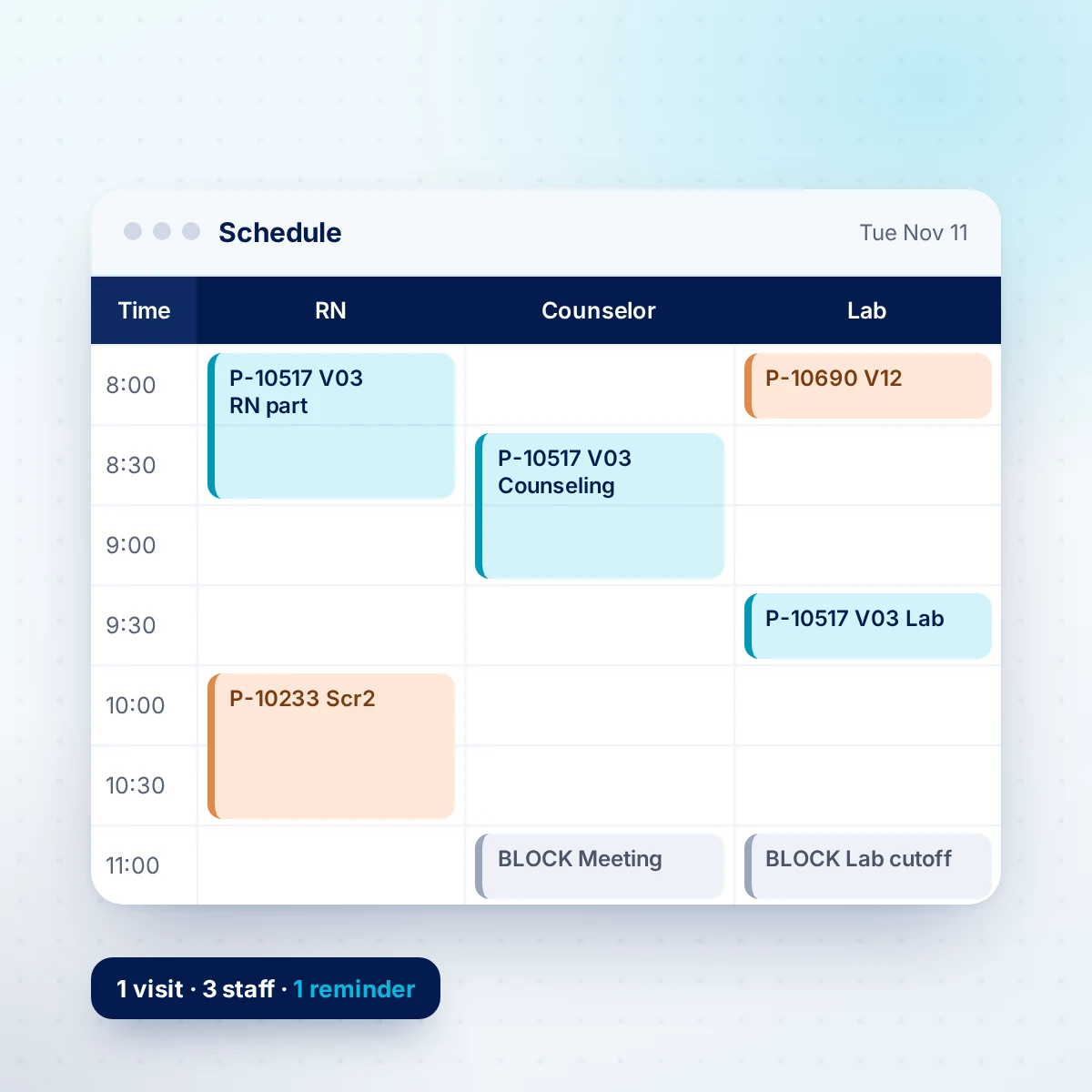
Book multi-staff study visits as one
Book a research visit with every person it needs. Each staff member gets their own part, with its own start time and length, in their own schedule column. The participant gets one reminder for the visit, not one per person.
- Add staff to a visit in one dialog, with double-booking and staff-hours warnings before you save
- Swap one staff member, or move one part, without rebooking the visit
- Recurring blocks for team meetings, lunch and lab cut-offs
- Full change history on every visit, and every earlier attempt kept
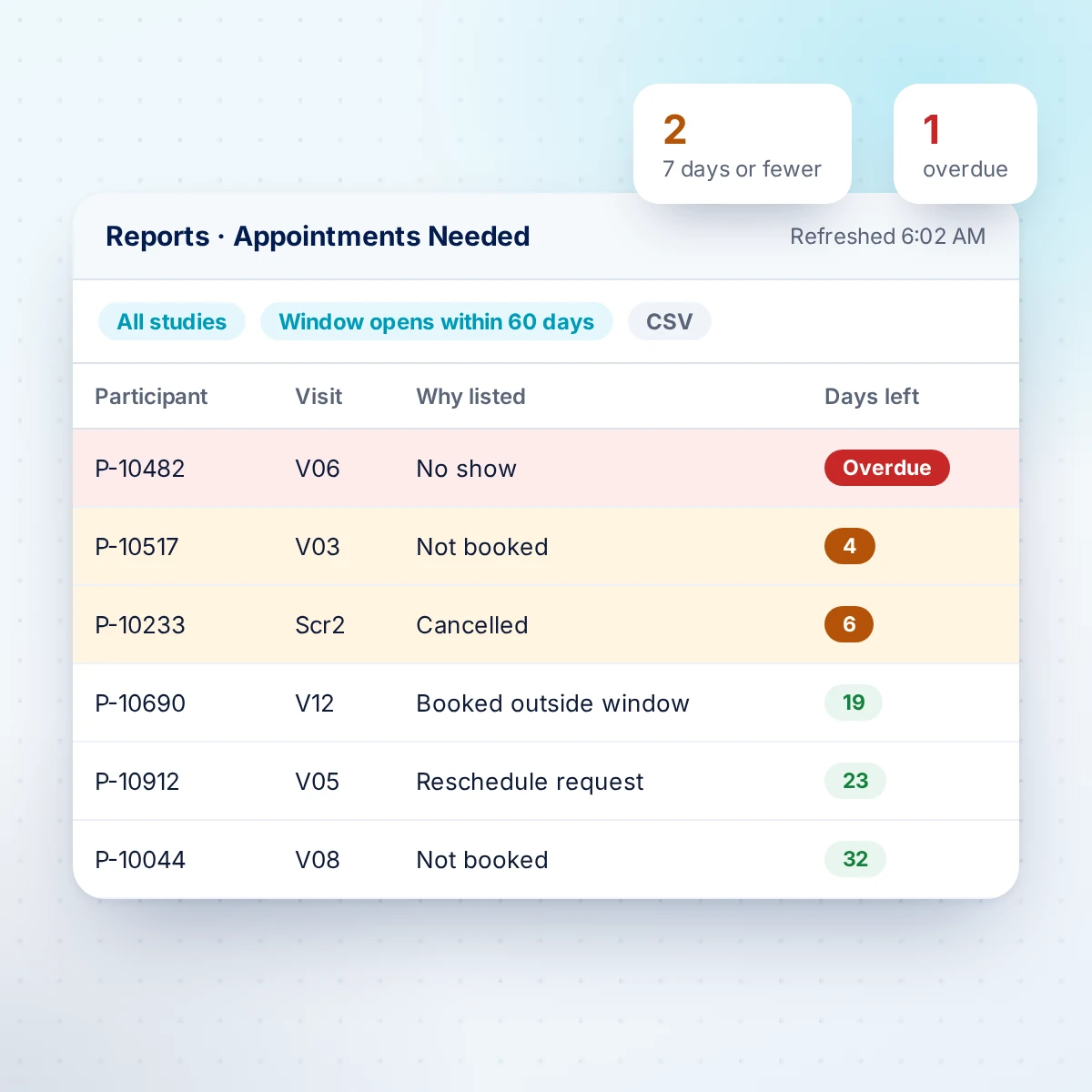
Appointments Needed: the research coordinator's daily list
Every required visit, across all studies, that is not seen, not ignored and not booked inside its window. Ranked by days left to the end of the allowable window, red when overdue and orange at seven days or fewer. Rebuilt overnight, so the morning starts with the red and orange rows.
- Includes no-shows, cancellations, reschedule requests and past visits never marked seen
- A participant's status can never hide a due visit
- Choose how far ahead to look and filter by study
- Click a name to book straight from the list; booked visits drop off
Study visit reminders that respect participants
Research visits use the same proven reminder delivery DoctorConnect practices rely on, with the controls studies need.
- Two reminder times you choose, timed from the earliest part of the visit
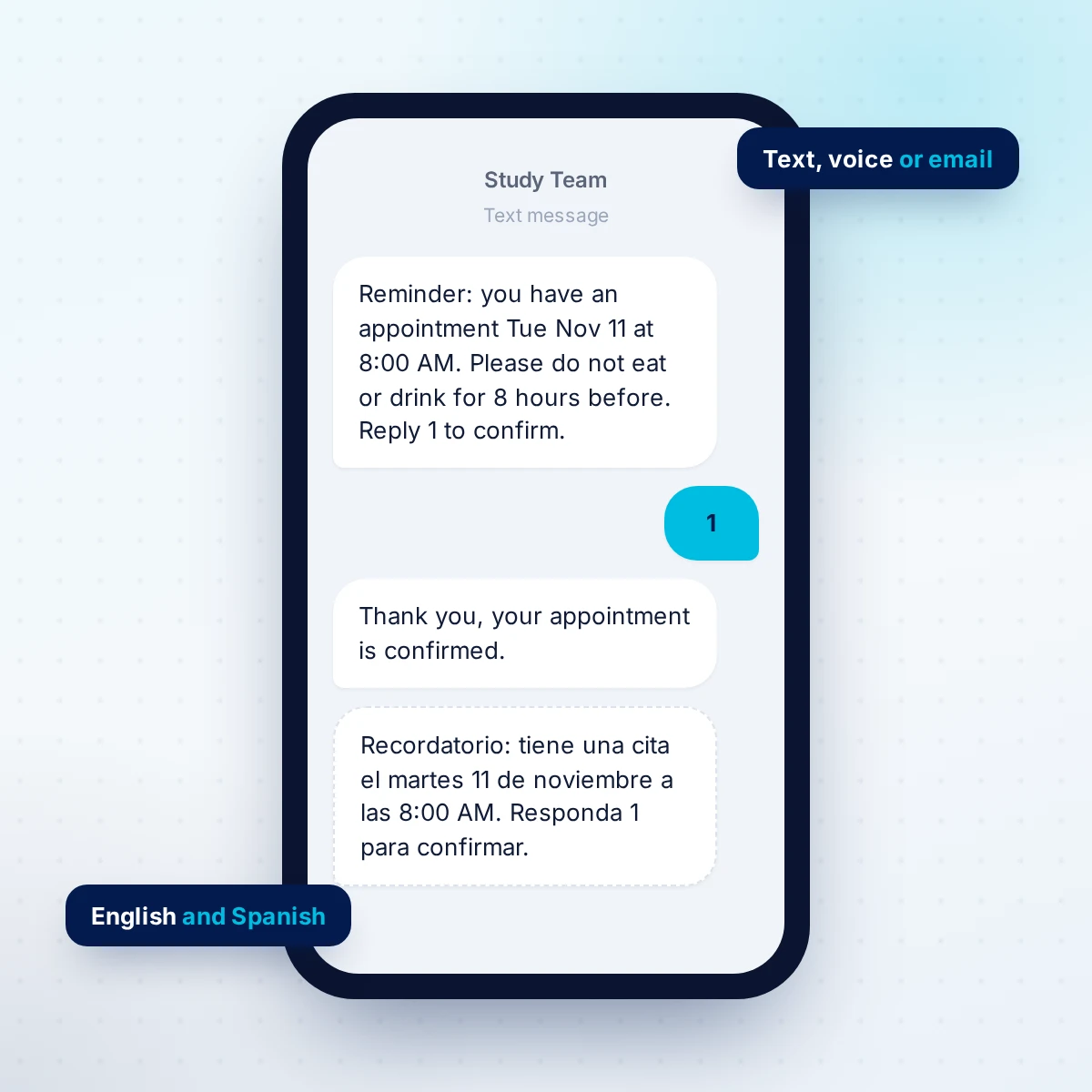
- Text, voice or email per participant; reply to confirm
- English or Spanish, set from the participant's preferred language
- Preparation instructions, such as fasting, added for the visits that need them
- Your sender name; the visit code never appears in a message
- Participants who opt out get nothing on any channel
Research reports your PI and sponsors ask for
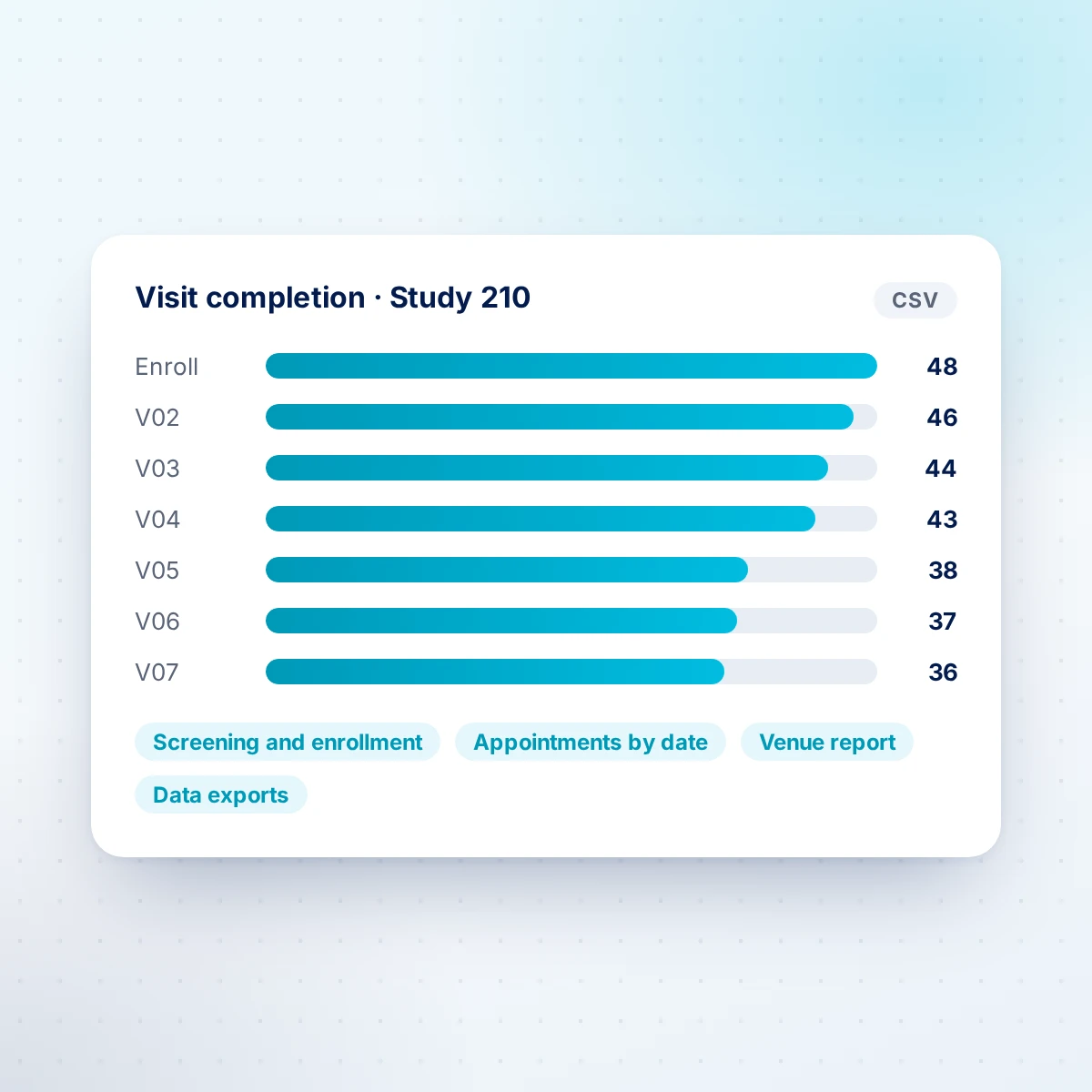
Run reports any time, without hand counting, and download CSV for anything you send on. Full data exports are limited to the administrators you name, and downloads of participant lists are logged.
- Visit completion: see where participants drop off, visit by visit
- Screening and enrollment table for sponsors
- Appointments by date, with every staff member on a multi-staff visit
- Participants in a study, and recruitment by venue
- Data exports of participants, study records, appointments and visit windows
How research participant scheduling gets set up
1. Load your protocols
We turn your study workbook into studies, arms, visit codes and window rules, with an exceptions report for anything that needs your call.
2. Bring your history
Participants, study records and past visits come from your exports. Every file is checked before anything is written, and counts are reconciled after.
3. Run both, then switch
Your coordinators train on a walkthrough, then run DoctorConnect beside the old system until the numbers match.
4. Work the list
Each morning, Appointments Needed shows what to book. Reminders go out, confirmations come back, and reports are a click away.
Fits beside your CTMS, EDC or REDCap
A full clinical trial management system covers budgets, invoicing and regulatory binders. If what you need every day is the schedule, the windows and the reminders, start here. Good fit: clinical research sites, public-health and community research units, vaccine and prevention trial units, longitudinal cohort studies, and medical practices that run studies alongside patient care.
- Spreadsheets or an Access database: one system for windows and the schedule, with the window logic you rely on now
- A scheduler that is being retired: scheduling, multi-staff visits and reminders, with your appointment history brought across
- REDCap for data collection: keep REDCap for your data and add a schedule, multi-staff booking and participant reminders
- A CTMS or EDC: runs alongside it for daily scheduling and reminders, with exports to share visit data
HIPAA-ready scheduling for sensitive studies
Encrypted per organization
Participant details, notes and free text are encrypted before they are saved, with an AES-256 key that belongs to your organization alone and is kept outside the database.
Every view logged
Opening a participant's record is logged like opening a chart. Changes to study records and visits keep a history of who changed what and when.
BAA and role controls
We sign a business associate agreement. Only the staff you designate can change study setup or download full exports; read-only users cannot book or edit.
Common questions
What is clinical trial scheduling software?
Software that schedules research participants against a study protocol rather than an open calendar. It knows when each required visit is due, which staff each visit needs, and which visits are at risk of falling outside their window. DoctorConnect adds participant reminders and research reports on top.
What is a protocol visit window?
The range of days in which a protocol allows a study visit to happen, counted from a start point such as the enrollment date. For example, day 28 with 3 days either side means days 25 to 31; many protocols also allow a wider window. A visit outside the window can be a protocol deviation.
Who is DoctorConnect Research Scheduling for?
Clinical research sites, public-health and community research units, vaccine and prevention trial units, investigator-initiated and grant-funded studies, longitudinal cohort studies, and medical practices that run studies alongside patient care.
Is DoctorConnect Research Scheduling a CTMS?
No. It is the scheduling, visit-window and reminder layer that research units use every day. It does not do sponsor invoicing, regulatory binders or electronic data capture. Many teams use it on its own; others run it alongside their CTMS or EDC and use the exports to share data.
How are protocol visit windows calculated?
Each window rule has a start point (the enrollment date, another study date, or the date a prior visit was seen), a target day, and the days allowed before and after, plus an optional wider allowable window. DoctorConnect works out five dates for every required visit of every enrolled participant and recalculates them every night and whenever a date or visit changes.
Can one visit include several staff members?
Yes. A visit can have several staff parts, each with its own start time and length in that person's schedule column. It counts as one visit for status, reports and reminders, and you can swap one staff member without rebooking the visit.
How do participant reminders work?
Each visit sends one reminder at each of two times you choose, timed from the earliest staff part. Each participant can get text, voice or email, in English or Spanish, and can reply to confirm. Preparation instructions such as fasting are added for the visits that need them, and the visit code is never included in the message. Participants who opt out get no reminders on any channel.
Can we bring our studies and history from Excel, Access or our current scheduler?
Yes. Study setups (studies, arms, visit codes and window rules) are imported from your workbook with an exceptions report for anything that needs a decision. Participants, study records and appointment history are imported from your exports: every file is checked before anything is written, counts are reconciled afterwards, and a test load can be taken back.
Is it HIPAA compliant?
DoctorConnect signs a business associate agreement. Participant details and notes are encrypted with a key that belongs to your organization alone, every participant record that staff open is logged, and only the staff you designate can change study setup or download full exports.
How is it priced?
Per visit, with a multi-staff visit counted once. Prepaid options are available for grant-funded programs. Talk to us about your studies and volume.
Show us your visit schedule
Send us one study's visit-window table (no participant data) and we will walk you through it running in DoctorConnect. Please do not include participant names or other personal details in the form.
Talk to us about your studies